Catalogue Ads for Shopify Stores in India: The Setup Behind a 12.51x Campaign
Catalogue retargeting was a Kerala jewellery brand's best Meta campaign at 12.51x ROAS. Here is how to connect a Shopify catalogue, check that it is matching products, and why the campaign only works if something keeps feeding it.

Of the 172 Meta campaigns I ran for a Kerala jewellery brand between January and August 2026, one consistently beat the rest: catalogue retargeting, at 12.51x ROAS. Every ₹1 spent brought back ₹12.51 in Shopify revenue.
Catalogue ads (Meta now calls them Advantage+ catalogue ads; you'll also see them called dynamic product ads) show each shopper the exact products they looked at on your website. For a Shopify store with many products, they're often the most efficient campaign you'll run. Here's how to set one up properly, and the honest caveat about why its ROAS looks so good.
What catalogue ads do
Someone visits your store, looks at a pair of earrings, maybe adds them to the cart, and leaves. A day later, they see those exact earrings in their Instagram feed, with the price, and a few similar pieces next to them.
You don't create an ad for every product. You create one template, and Meta fills it with the right products for each person, pulling from your product catalogue.
Step by step: set up catalogue ads for Shopify
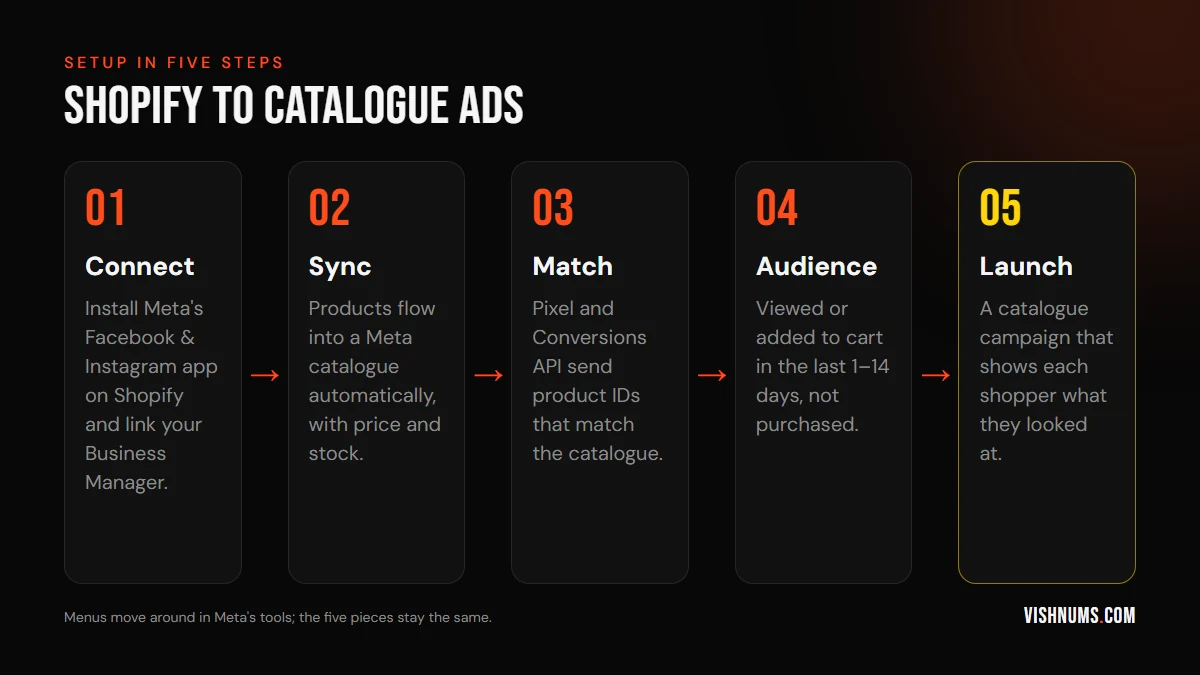
1. Connect Shopify to Meta
Install Meta's official Facebook & Instagram app from the Shopify App Store and connect it to your Business Manager, ad account, pixel and Facebook page. Turn on the strongest data-sharing setting available, which enables the Conversions API alongside the browser pixel.
2. Sync your catalogue
The app creates a catalogue in Commerce Manager and keeps it updated with your products, prices and stock. Check that the number of products in the catalogue roughly matches your store, and that nothing important is disapproved.
3. Make sure product IDs match
This is the step that silently breaks most catalogue campaigns. When someone views a product, your pixel sends a ViewContent event with a product ID. That ID must match the ID of the same product in your catalogue. If it doesn't, Meta can't show the right product, and your "dynamic" ad shows random items.
In Events Manager, check the catalogue match rate for your ViewContent, AddToCart and Purchase events. If it's low, the Shopify integration usually needs reconnecting, or a theme or third-party app is overriding the events.
4. Build the audience
For retargeting, the classic audiences are:
- Viewed or added to cart in the last 1 to 14 days, but didn't purchase. This is the core.
- Added to cart in the last 30 days, didn't purchase. For a considered purchase like jewellery, people take longer.
- Purchased in the last 180 days. For cross-selling, shown related products, not the same ones.
I cover how long these windows should be in retargeting windows for high-ticket products.
5. Build the ad
Use a carousel or collection format with a strong frame: your logo, a trust line (BIS hallmarked, free shipping, easy exchange) and a clear call to action. Let Meta pull product names and prices from the catalogue.
Catalogue health: where the ROAS really comes from
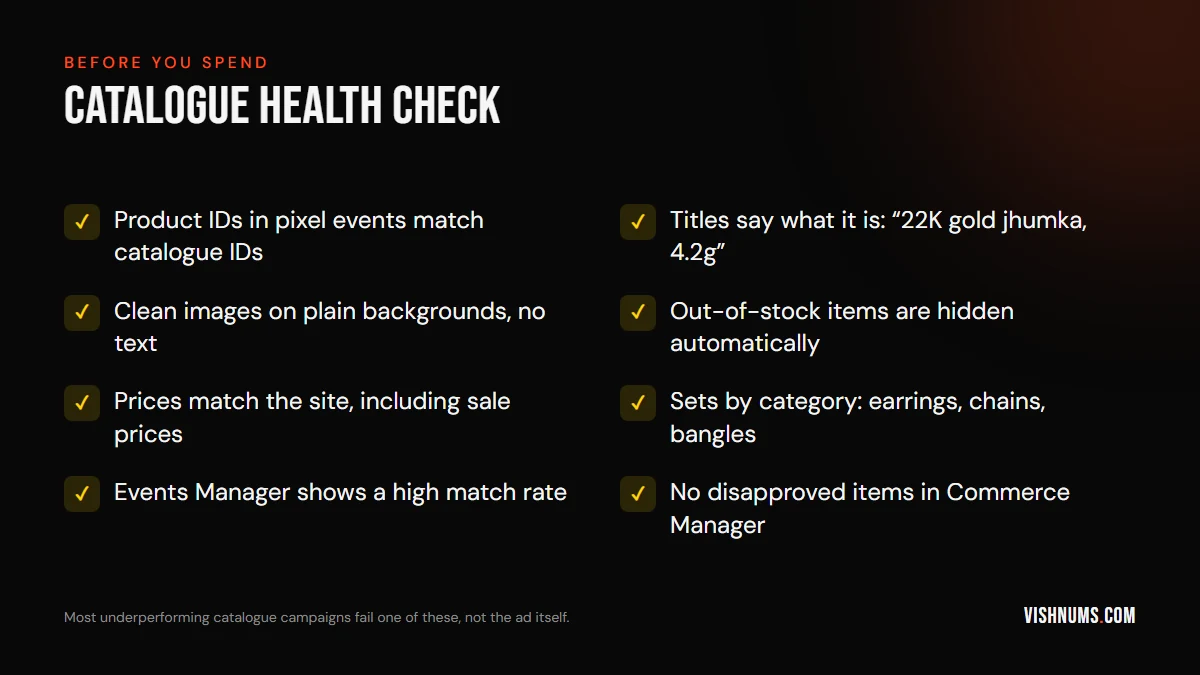
The ads are only as good as the catalogue. A few things make a real difference:
- Descriptive titles. "22K gold jhumka, 4.2g" sells better than "Product 1043".
- Clean images. Plain backgrounds, the product filling the frame, no text overlays.
- Accurate stock and prices. Showing a sold-out item, or a price that's changed, wastes the click and annoys the shopper.
- Product sets. Group products by category so you can run different creative for earrings, chains and bangles, or exclude low-margin items.
The honest caveat: retargeting ROAS flatters itself
Catalogue retargeting shows ads to people who were already on your site, already looking at a product. Some of them would have come back and bought anyway. So part of that 12.51x is credit for sales the campaign didn't really create.
That doesn't mean it isn't worth running. It means you shouldn't move all your budget into it. A retargeting campaign needs something to retarget. For the jewellery brand, the structure was:
- Prospecting with Reels and video, including state-wise creative for Kerala, Tamil Nadu and Karnataka, plus all-India and location campaigns.
- Mid-funnel engagement with 30, 60 and 180-day windows to bring past visitors and buyers back.
- Catalogue retargeting to close the sale.
Cut prospecting, and within weeks your retargeting audiences shrink and that 12.51x campaign starts to fade. The prospecting campaigns look worse on paper because the catalogue campaign gets credit for the final sale, but they're doing the work of finding new shoppers. That's why I judge the account on blended ROAS across all campaigns: for this brand, every month closed above 5x, and the best month hit 8.32x. Read the case study.
Catalogue ads for prospecting
Catalogue ads aren't only for retargeting. You can also show catalogue products to broad audiences who have never visited your site, letting Meta pick products each person is likely to want. It's worth testing alongside your video prospecting, especially if you have a wide range.
Most catalogue prospecting now runs inside Advantage+ sales campaigns. See when Advantage+ works for small D2C brands before you switch.
Common problems and fixes
- Ads show random products. Your pixel's product IDs don't match the catalogue. Check the match rate in Events Manager.
- Audience too small to deliver. Widen the time window, or add more prospecting to feed it.
- Frequency climbing high. A small audience with a big budget. Lower the budget or widen the window. Here's how to judge frequency.
- Lots of products disapproved. Fix them in Commerce Manager. Disapproved items can't appear in ads.
Frequently asked questions
Are catalogue ads the same as dynamic product ads?
Yes. Meta has renamed them over the years: dynamic ads, dynamic product ads, and now Advantage+ catalogue ads. They all show products from your catalogue based on what each person viewed or is likely to want.
Do I need the Conversions API for catalogue ads?
It isn't strictly required, but it's strongly recommended. Browser-only tracking misses events, especially on iPhones, which means fewer people in your retargeting audiences and weaker product matching.
Why is my catalogue retargeting ROAS so high?
It reaches people who are already interested, so it's naturally efficient, and it also gets credit for some sales that would have happened anyway. Judge it alongside the prospecting that feeds it.
Running a Shopify store and want your catalogue campaigns set up properly? Request a quote.
Ads, a website that converts, or both: get a custom quote.