GA4 Tracking for Hotel Booking Engines: Why Your Bookings Don't Show Up
Many hotel websites track every click in GA4 except the confirmed booking. Here is why third-party booking engines cause it, and a step-by-step fix: cross-domain tracking, payment gateways and the purchase event.

Open the GA4 property of a typical hotel or resort website and you'll find plenty of data: page views, scrolls, clicks on "Check availability", maybe even "room selection viewed". Then look for the most important event of all, a confirmed booking, and it often isn't there.
A resort I work with had exactly this. GA4 tracked more than a dozen kinds of events on its site, including availability checks and room views, but not a single event for a completed booking. Every marketing report was flying blind at the last step.
If your Google Ads account says it's getting "conversions" but you can't connect them to real bookings, this is probably why.
Why hotel bookings go missing in GA4
Most hotels don't take bookings on their own website. The "Book now" button sends the guest to a booking engine on a different domain, which then sends them to a payment gateway on yet another domain, and back.
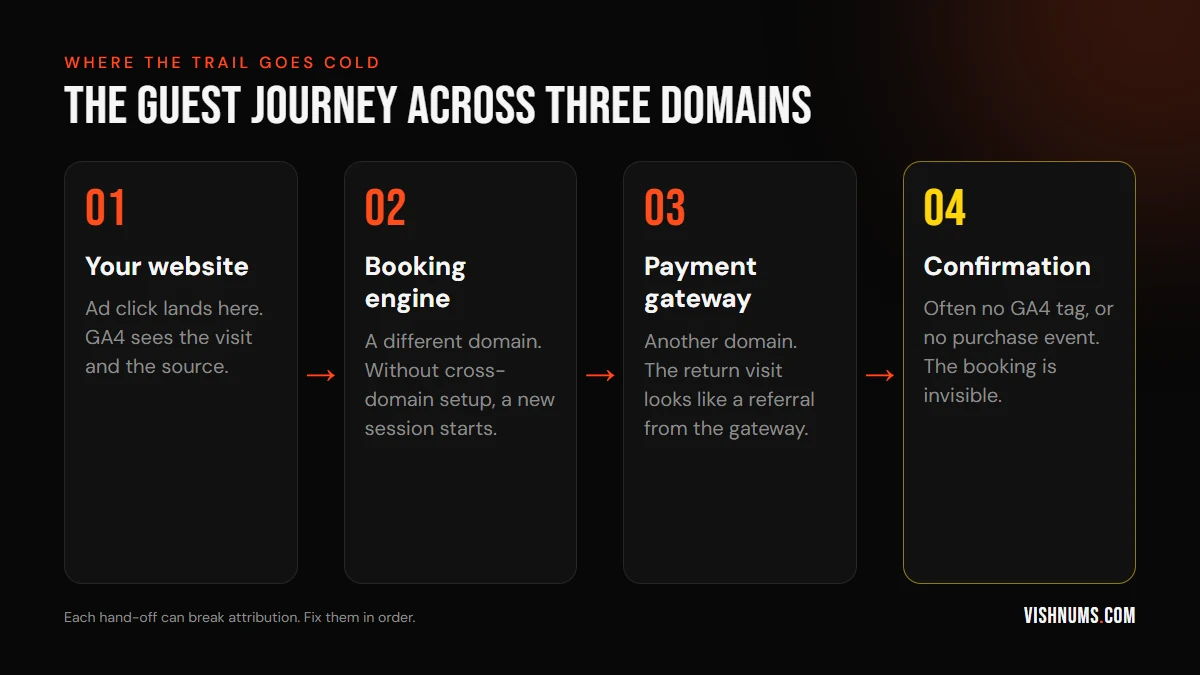
Three things typically go wrong:
- 01No cross-domain tracking. When the guest moves from your site to the booking engine, GA4 starts a new session and forgets they came from your Google ad.
- 02Payment gateway referrals. When the guest returns from the payment page, GA4 credits the booking to the gateway's domain as a "referral", wiping out the original source.
- 03No purchase event. The confirmation page either has no GA4 tag at all, or has one that only records a page view, with no booking value.
Step 1: Find out what your booking engine supports
Before changing anything, ask your booking engine provider:
- Can we add our own GA4 measurement ID?
- Do you send a GA4 purchase (or booking) event with value and transaction ID?
- Do you support cross-domain tracking with our main website?
- Can we add Google Tag Manager to the booking and confirmation pages?
Many booking engines support some or all of this. Some only allow a confirmation page script. A few support nothing, in which case your CRM or PMS becomes the source of truth.
While you're asking, check whether it's a Google Hotel connectivity partner. That's what puts your direct rate in Google's price list. More in Google free booking links for hotels in India.
Step 2: Use the same GA4 property everywhere
Your website and the booking engine should send data to the same GA4 property. Two separate properties mean two separate stories, neither of them complete.
Step 3: Set up cross-domain measurement
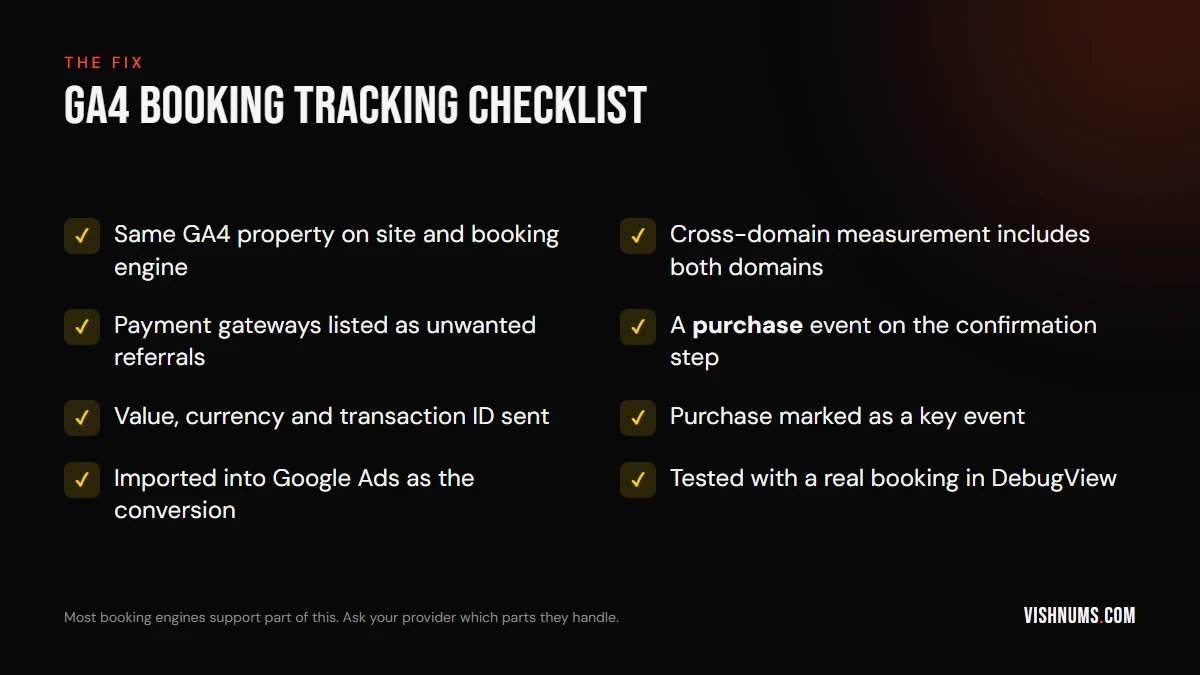
In GA4, go to Admin, then Data streams, choose your web stream, open the Google tag settings, and configure your domains. Add both your website domain and the booking engine domain. This lets GA4 carry the same session across both, so the original source (your Google ad, Instagram, organic search) stays attached to the booking.
Step 4: Stop payment gateways stealing the credit
In the same tag settings, list unwanted referrals: add your payment gateway domains (Razorpay, PayU, CCAvenue, PayPal or whichever you use). GA4 will then stop treating the return from the payment page as a new referral visit.
Step 5: Send a real purchase event
The confirmation step needs a purchase event (or a clearly named booking event) that includes:
- value: the booking amount
- currency: INR
- transaction_id: the booking ID, so GA4 doesn't count a refreshed page twice
Then mark it as a key event in GA4.
Step 6: Use it in Google Ads
Link GA4 to Google Ads and import the purchase event as your primary conversion, or set up a Google Ads conversion tag on the confirmation page directly. Now Google Ads can optimise for bookings, not for clicks on "Check availability".
Step 7: Test with a real booking
Use GA4's DebugView or Tag Assistant, make a real (refundable) booking from a tagged link, and check:
- The session continues from your site to the booking engine without a new source appearing.
- The purchase event fires once, with the right value.
- The source shows your test link, not the payment gateway.
What GA4 still won't see
Even with perfect setup, GA4 misses a lot of hospitality revenue:
- Phone and WhatsApp bookings, which are a large share for many Kerala properties.
- Bookings from leads that your team closes days later.
- Guests who block tracking in their browser.
That's why I measure resort ads against the CRM, not just GA4. For the Munnar resort, every lead goes into the CRM and gets an outcome, so we can count booking revenue by channel, which is how we know October 2026 returned 5.9x on ad spend. GA4 then fills in the website bookings that never touch the CRM. See how the full system works.
If you run Meta Ads too, you can also send CRM bookings straight back to Meta. Here's how to use the Conversions API for CRM bookings.
Frequently asked questions
Why doesn't GA4 show my hotel bookings?
Usually because the booking happens on a separate booking engine domain without cross-domain tracking, the payment gateway overwrites the traffic source, or the confirmation page doesn't send a purchase event.
How do I stop Razorpay or PayU showing as a referral in GA4?
Add the payment gateway's domain to the list of unwanted referrals in your GA4 Google tag settings.
Should Google Ads optimise for "Check availability" clicks?
Only as a temporary measure if you have no booking data. It's much better to optimise for confirmed bookings with a value, so Google finds people who book, not people who browse.
Want your booking tracking fixed and your ads measured against real revenue? That's the kind of build-and-measure work I do, with help from vibe coding. Get a quote.
Ads, a website that converts, or both: get a custom quote.