WhatsApp Business API Pricing in India (2026): Per-Message Rates, Free Windows and Real Costs
WhatsApp Business API costs in India in 2026: Meta's per-message rates for marketing, utility and authentication, the October 2026 changes, free ad-entry windows, provider fees, GST and a bill estimate.
WhatsApp is how India does business. Customers ask prices, book appointments, confirm orders and get delivery updates on WhatsApp far more than by email or phone. As businesses grow, many move from the free WhatsApp Business app to the WhatsApp Business Platform (often called the WhatsApp Business API) for automation, shared inboxes and bulk messaging.
Then the bills arrive, and they're confusing. Meta charges per message, by category, with free windows that depend on how the conversation started. Your provider (a Business Solution Provider, or BSP) adds its own fees. GST is added on top. And the pricing model changed in 2025 and again in 2026.
This guide explains WhatsApp Business API pricing in India in plain language: Meta's current rates, the message categories, the free windows, how Click-to-WhatsApp ads affect costs, what providers charge, how GST applies, how to estimate your monthly bill, and how to keep costs down. Rates change, so treat the numbers here as a snapshot and check Meta's current rate card and your provider's pricing before budgeting. You'll also find template examples, a provider checklist, a setup walkthrough and cost patterns for different types of business.
The numbers at a glance
- Since July 1, 2025, Meta charges per delivered template message, by category, instead of per 24-hour conversation.
- Meta's listed India rate for marketing templates is ₹0.8631 per delivered message from January 1, 2026 (up from ₹0.7846).
- Utility and authentication templates are listed at about ₹0.115 each.
- Service replies (your free-form replies within 24 hours of a customer's message) are free for the first 1,000 per phone number each month since October 1, 2026; after that they're charged.
- Utility templates sent inside an open customer service window were free from July 2025, but Meta resumed charging for them on October 1, 2026.
- If a customer messages you from a Click-to-WhatsApp ad and you reply within the 24-hour window, that reply is free and opens a free entry point window that can stay open for up to 7 days, in which all message categories are free.
- Add your provider's fees and 18% GST to estimate the real cost.
The message categories
Meta classifies template messages into categories. The category decides the price.
Marketing
Promotions, offers, announcements, product recommendations, re-engagement messages, festival greetings with offers, abandoned cart reminders. Anything meant to sell or promote counts as marketing. This is the most expensive category.
Utility
Messages about a specific transaction or account the customer already has: order confirmations, shipping updates, booking confirmations, payment reminders, appointment reminders. These are much cheaper than marketing messages. Since October 1, 2026 they're charged even inside an open service window, unless they fall within a free entry point window from a Click-to-WhatsApp ad.
Authentication
One-time passwords and verification codes. Priced similarly to utility in India, with separate rules for international authentication.
Service
Free-form replies to customers who messaged you, sent within 24 hours of their last message. These aren't templates. Since October 1, 2026, each business number gets 1,000 free delivered service messages a month, and Meta charges from the 1,001st at its published rate.
Meta reviews templates when you submit them and can recategorise a "utility" template that's really promotional as marketing. Write utility templates strictly about the transaction to avoid surprises.
Meta's India rates in 2026
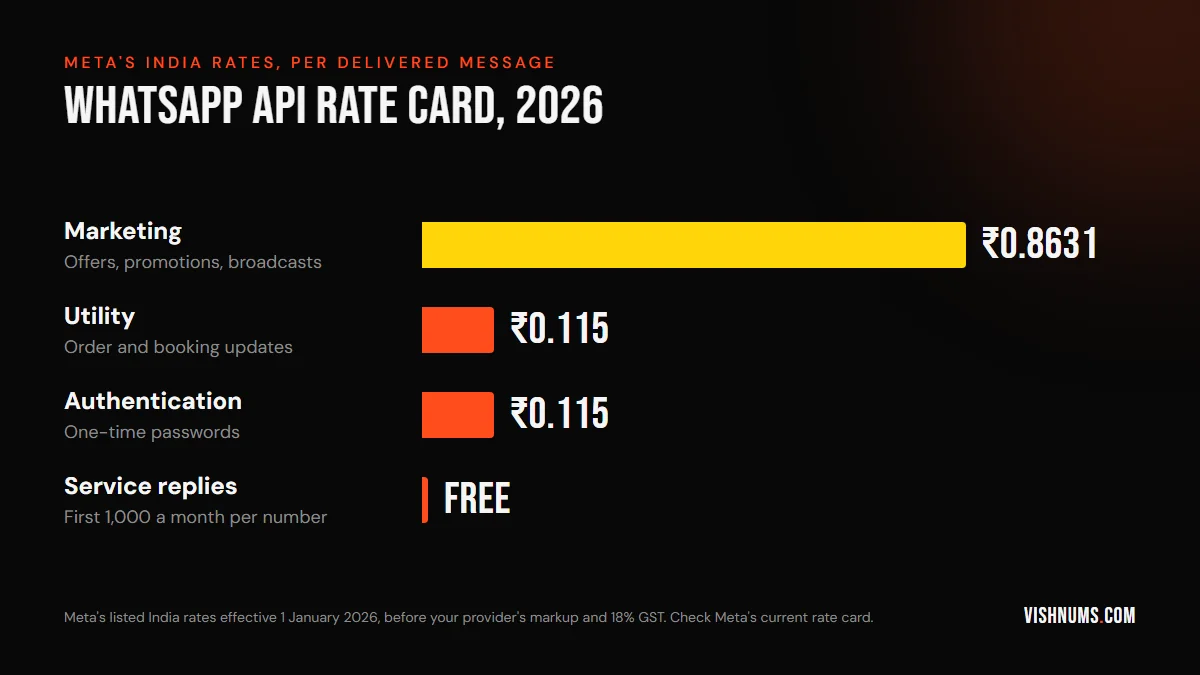
Meta's listed India rates, per delivered message, as of 2026:
- Marketing: ₹0.8631 (effective January 1, 2026; previously ₹0.7846).
- Utility: about ₹0.115.
- Authentication: about ₹0.115. Meta separately raised India's international authentication rate from April 1, 2026.
- Service: the first 1,000 per number per month are free (from October 1, 2026); further service messages are charged at Meta's published rate.
Meta also offers volume tiers for utility and authentication messages, where the per-message rate falls as monthly volume rises. Marketing messages don't get volume discounts in the same way.
Meta launched INR billing on January 1, 2026, and its pricing page says accounts must move to INR by December 31, 2026, or message delivery stops on January 1, 2027, so check your billing currency now. Rates are set by the country of the recipient's phone number. Messages to customers abroad (for example, NRIs with Gulf numbers) are charged at that country's rates, which can be higher or lower.
Rates change from time to time. Always check Meta's official WhatsApp Business Platform pricing page before budgeting.
The free windows, and what changed in October 2026
The 24-hour customer service window
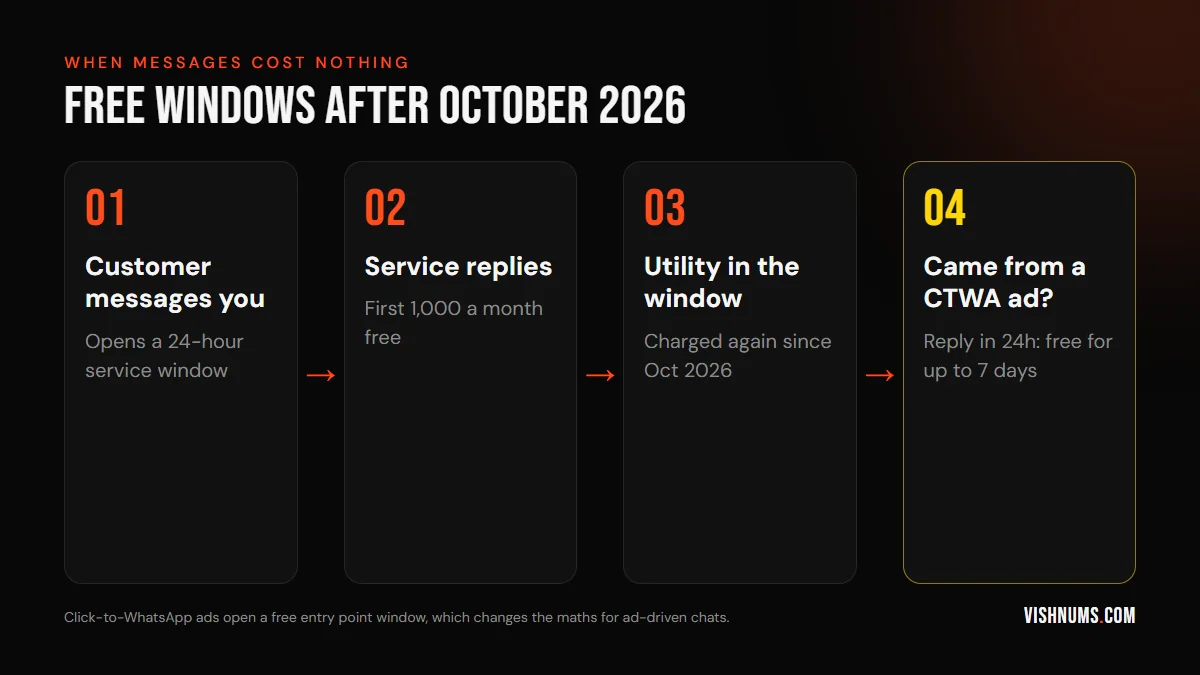
When a customer messages you, a 24-hour window opens. During it:
- You can send free-form (non-template) replies. The first 1,000 service messages each month are free; after that they're charged.
- Utility templates are charged at the utility rate. They were free inside the window from July 2025, but Meta resumed charging on October 1, 2026.
- Marketing templates are still charged.
Every new message from the customer resets the 24-hour window, so you can keep replying with free-form messages as long as the customer keeps the conversation going.
The free entry point window from Click-to-WhatsApp ads
When a customer messages you through a Click-to-WhatsApp ad (on the WhatsApp mobile app) and you reply within the 24-hour customer service window, your reply isn't charged and it opens a free entry point window, counted from the time you replied. Meta says this window may remain open for up to 7 days, and marketing, utility, authentication and service messages sent in it are free.
This matters a lot for businesses that use Click-to-WhatsApp ads. You can follow up with offers, booking confirmations and reminders for three days without per-message charges. It's one reason Click-to-WhatsApp ads can be cost-effective for lead generation. Our guide to Click-to-WhatsApp vs lead form ads compares the two approaches.
What providers charge
Most businesses access the API through a Business Solution Provider (BSP) or a platform built on top of one. Providers charge in different ways:
- Monthly subscription: a platform fee for features like a shared inbox, chatbot builder, broadcast tools and integrations.
- Markup on messages: some add a margin on top of Meta's per-message rate. A provider quoting around ₹1 per marketing message may be adding markup and GST to Meta's rate.
- Setup fees: for onboarding, number migration or custom integrations.
- Per-agent fees: for team inboxes with several users.
When comparing providers, ask for the per-message price broken down into Meta's rate and their markup, and whether GST is included. A cheap subscription with a high message markup can cost more than a pricier subscription at Meta's rates.
GST
GST at 18% applies to the services you buy. How it's charged depends on whether you're billed by Meta directly or through a provider, and on your GST registration. If you're GST-registered, you may be able to claim input tax credit on the GST you pay; check with your accountant. Our guide to GST on Meta ads in India explains input tax credit for Meta's ad invoices, which follows similar principles.
Estimating your monthly bill
Here's a simple way to estimate. These are illustrative numbers; use your own volumes and current rates.
A clinic sends:
- 2,000 appointment reminders a month (utility): 2,000 × ₹0.115 = ₹230.
- One monthly health tip broadcast with an offer to 5,000 patients (marketing): 5,000 × ₹0.8631 = about ₹4,316.
- Replies to 1,500 patient enquiries (service): the first 1,000 free, the remaining 500 charged at the service rate on Meta's rate card.
- Follow-ups to 300 leads from Click-to-WhatsApp ads inside their free entry point windows: free.
Meta charges come to about ₹4,546 plus the 500 service messages beyond the free tier. Add the provider's subscription and any markup, then 18% GST on the total. The marketing broadcast is by far the largest cost. Sending it to only engaged patients, or every other month, would cut the bill sharply.
The WhatsApp Business app vs the API
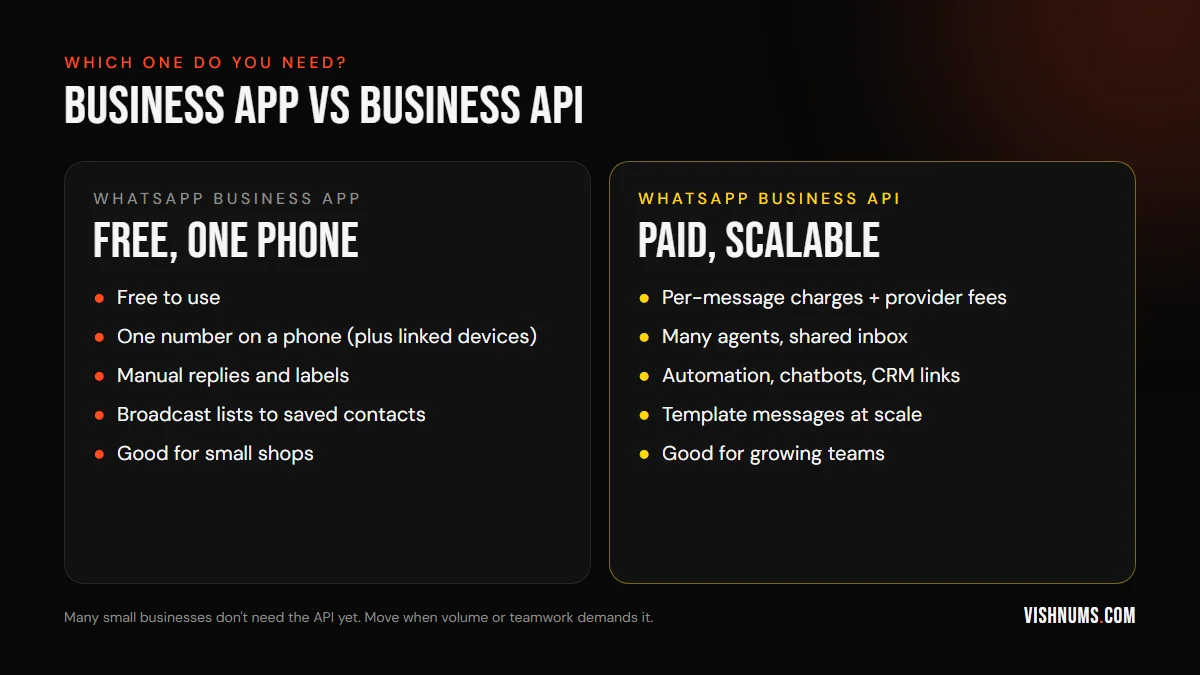
The free WhatsApp Business app is enough for many small businesses:
- Free to use.
- Catalogue, quick replies, labels, greeting and away messages.
- Broadcast lists to contacts who've saved your number.
- Works on a phone with linked devices.
Consider moving to the API when:
- Several people need to handle chats from one number.
- You need automation: chatbots, order updates, booking reminders from your systems.
- You want to connect WhatsApp to your CRM, e-commerce platform or booking engine.
- You need to send template messages at scale.
- You want reliable tracking of which ads lead to which chats.
Moving a number from the app to the API usually means that number can no longer be used in the regular app, so plan the switch carefully with your provider.
Getting started, step by step
If you've decided the API is right for you, the process usually looks like this:
- 01Set up a Meta Business Portfolio (formerly Business Manager) and verify your business. Verification raises messaging limits and builds trust.
- 02Choose a provider (see the checklist below), or connect directly through Meta's Cloud API if you have developers.
- 03Pick a phone number. It can be a new number or an existing one, but a number registered on the API typically can't be used in the regular WhatsApp app at the same time.
- 04Set your display name and profile, matching your business name. Meta reviews display names.
- 05Add a payment method for Meta's message charges, either through Meta directly or through your provider.
- 06Create message templates for the messages you'll send outside the customer service window, and submit them for approval.
- 07Connect your systems: CRM, e-commerce platform, booking engine or support tools.
- 08Train your team on the shared inbox, templates and response times.
Expect setup to take from a few days to a couple of weeks, depending on verification and integrations.
Template examples
Templates must be approved before use. Write them clearly and in the right category.
Utility: order confirmation
"Hi {{1}}, thank you for your order {{2}} with [Store]. We've received it and will share tracking details once it ships. Reply here if you have any questions."
Utility: appointment reminder
"Hi {{1}}, this is a reminder of your appointment at [Clinic] on {{2}} at {{3}}. Reply 1 to confirm or 2 to reschedule."
Marketing: festival offer
"Hi {{1}}, our Onam collection is here! Enjoy {{2}} off on kasavu sarees until {{3}}. Tap below to browse. Reply STOP to unsubscribe."
Marketing: back-in-stock
"Good news, {{1}}! The {{2}} you asked about is back in stock. Tap below to order before it sells out again."
Keep utility templates free of promotional language. Adding "Use code SAVE10 on your next order" to a shipping update can turn it into a marketing message.
Choosing a provider
There are many WhatsApp providers in India. When comparing, ask:
- What's your per-message price, broken into Meta's rate and your markup? Is GST included?
- What's included in the subscription: number of agents, chatbot builder, broadcast tools, integrations, analytics?
- Can you connect to my systems (Shopify, my CRM, my booking engine)?
- Do you show which ad each conversation came from?
- What support do you offer, in what hours and languages?
- What's the contract length, and can I move my number if I leave?
- How do you handle quality rating issues and template rejections?
Run a short trial before committing, and estimate your monthly bill using your real message volumes from the last few months.
Examples by business type
These are illustrative patterns, not quotes.
A D2C brand
Order confirmations and shipping updates (utility) make up most messages, and since October 2026 they're charged whether or not the customer has messaged recently. At around ₹0.115 each, they're still cheap. Marketing broadcasts for new launches and sales are the main cost. Abandoned cart reminders are marketing messages, so test whether they earn more than they cost.
A resort or homestay
Chats that start from Click-to-WhatsApp ads get free entry point windows if answered within 24 hours, so many follow-ups cost nothing. Booking confirmations and pre-arrival details are utility. Festival offers to past guests are marketing; keep them occasional and targeted. Our guide to how to follow up resort enquiries covers the messaging side.
A clinic or lab
Appointment reminders and report notifications are utility. Health tips with offers are marketing. Patient enquiries are service replies, free up to 1,000 a month per number.
A coaching centre
Admission enquiries from ads fall into free windows if answered quickly. Class schedules and fee reminders are utility. Course launch announcements are marketing.
In every case, fast replies to ad-driven chats and careful use of marketing broadcasts keep costs reasonable.
Keep costs under control
- Segment marketing messages. Send offers only to customers likely to care, rather than your entire list.
- Use utility templates for genuine transactions and send them inside open windows when possible.
- Reply to ad leads within 24 hours to open the free entry point window.
- Answer questions with free-form replies inside the customer service window instead of sending templates; the first 1,000 service messages a month are free.
- Clean your list: remove numbers that never read or reply.
- Watch template categories: promotional content in utility templates may be reclassified as marketing.
- Compare providers on total cost, not subscription price alone.
Don't spam: quality affects your account
Meta monitors how customers respond to your messages. If many people block or report your number, your quality rating falls, which can limit how many messages you can send or even restrict the number. In India, Meta has also limited how many marketing messages a person receives from businesses in a period, so some marketing messages may not be delivered (and aren't charged).
- Get clear opt-in before sending marketing messages.
- Make it easy to opt out.
- Send relevant, occasional messages, not daily promotions.
A smaller, engaged list is cheaper and more effective than a large one full of people who block you. Check your quality rating in WhatsApp Manager regularly, especially after large broadcasts.
Track which ads lead to conversations
With the API, you can record which Click-to-WhatsApp ad each conversation came from, and connect that to bookings or sales. That's how you calculate the real cost per customer from WhatsApp campaigns. Our guide to tracking WhatsApp leads from Facebook ads explains the setup, and sending CRM outcomes to the Conversions API shows how to feed results back to Meta.
How pricing used to work, and why it changed
Before July 2025, Meta charged per 24-hour conversation. A business paid once for a conversation window, regardless of how many messages were sent inside it, with different prices for marketing, utility, authentication and service conversations. Service conversations later became free.
The switch to per-message pricing means you now pay for each delivered template message, not for the conversation. For businesses that sent one or two templates per conversation, costs may be similar. For businesses that sent several templates in a row, costs can rise. For businesses that mostly reply to customers, costs fell at first, but the October 2026 changes (paid utility replies, and service messages free only up to 1,000 a month) pushed some of that back up.
If you budgeted under the old model, or even before October 2026, recalculate using your actual message volumes by category, including service replies.
Is WhatsApp marketing worth the cost?
At under a rupee per marketing message, WhatsApp can still be far cheaper than many other channels, and open rates are typically much higher than email. But cost per message isn't the right measure. Ask:
- How much revenue does each broadcast bring? Track orders or bookings from each campaign.
- How many people block or opt out after each broadcast?
- Would a smaller, targeted send earn the same at a fraction of the cost?
Treat each marketing broadcast like an ad campaign: measure what it returns, and stop sending what doesn't pay.
Reporting and invoices
Keep an eye on your spending:
- Meta's WhatsApp Manager shows message volumes and charges by category and country.
- Your provider's dashboard usually shows the same, plus its own fees.
- Monthly invoices should separate Meta's charges, provider fees and GST, which helps with accounting and input tax credit.
Review costs monthly. A sudden jump usually means a template was reclassified, a broadcast went to too many people, or an automation is sending more messages than intended.
Costly mistakes
- Assuming the API is free like the Business app.
- Sending marketing broadcasts to everyone without segmentation.
- Missing the 24-hour reply window on ad leads and losing the free entry point window.
- Budgeting with pre-October 2026 rules, when utility replies and all service messages were free.
- Promotional content in utility templates, which gets reclassified.
- Comparing providers on subscription price while ignoring message markup.
- Forgetting GST when budgeting.
- Ignoring quality ratings until the number is restricted.
Sources and further reading
Meta publishes the official rate card and window rules here, and it changes several times a year:
- Meta for Developers: WhatsApp Business Platform pricing for current rate cards and free windows
Frequently asked questions
How much does WhatsApp Business API cost per message in India?
Meta's listed India rate for marketing templates is ₹0.8631 per delivered message from January 1, 2026. Utility and authentication templates are about ₹0.115. Service replies are free for the first 1,000 a month per number. Provider fees and 18% GST are extra.
Is the WhatsApp Business API free?
No. The free product is the WhatsApp Business app. The API charges per delivered template message, plus your provider's fees, though the first 1,000 service messages a month and messages inside a Click-to-WhatsApp free entry point window cost nothing.
What is the free entry point window on WhatsApp?
When a customer messages you from a Click-to-WhatsApp ad and you reply within the 24-hour service window, your reply is free and opens a window that Meta says may stay open for up to 7 days, in which messages of every category are free.
When did WhatsApp switch to per-message pricing?
Meta moved from conversation-based pricing to per-message pricing on July 1, 2025.
Are utility messages free on WhatsApp?
Not any more, in most cases. Utility messages sent inside an open customer service window were free from July 2025, but Meta resumed charging for them on October 1, 2026. They're still free inside a free entry point window opened by a Click-to-WhatsApp ad.
Are service replies still free?
Each business phone number gets 1,000 free delivered service messages a month from October 1, 2026. Meta charges from the 1,001st.
Do I pay for messages to NRI customers abroad?
Rates depend on the country of the recipient's phone number, so messages to Gulf numbers are charged at those countries' rates.
Do I need a provider, or can I connect directly?
You can connect directly through Meta's Cloud API if you have developers to build the integration. Most small and medium businesses use a provider, which adds an inbox, templates management, automation tools and support.
Why did my WhatsApp bill suddenly increase?
Common reasons include a template reclassified as marketing, a broadcast sent to a larger list, an automation sending more messages than planned, or a rate change. Check your provider's dashboard and Meta's WhatsApp Manager by category.
Can I use the same number on the app and the API?
Generally, a number registered on the API can't be used in the regular WhatsApp Business app at the same time. Some providers support coexistence features; ask yours before migrating.
Want WhatsApp set up to bring customers without surprise bills? Request a quote.
Ads, a website that converts, or both: get a custom quote.