Boost Post vs Ads Manager: Which Should a Small Business in India Use?
A plain-language guide for Indian small business owners: what the Boost button really does, how it differs from Ads Manager, when boosting is fine, when it wastes money, and a step-by-step first campaign in Ads Manager.
Almost every small business owner in India has pressed the blue "Boost post" button at some point. It's right there under your Facebook or Instagram post, it asks for a budget and a few days, and within minutes your post is reaching more people. Many shops, clinics, restaurants and home businesses do nothing else.
Then they hear from someone that boosting is "a waste of money" and that "real marketers use Ads Manager." Both statements are half true. Boosting isn't always wasteful, and Ads Manager isn't always necessary. What matters is what you want the money to achieve.
This guide explains, in plain language, what boosting does, how it differs from Ads Manager, when boosting is perfectly fine, when it quietly wastes your budget, and how to set up a simple first campaign in Ads Manager. It's written for Indian small business owners who handle their own social media, not for agencies. If you run a shop, clinic, restaurant, boutique, salon, training centre or home business and manage your own Facebook and Instagram pages, this is for you. You'll also find a simple ad copy structure, guidance on choosing between messages, leads and traffic, an introduction to retargeting, and a 30-day plan for making the switch without losing what already works for you.
Short version
- Boosting is a simplified way of creating an ad from an existing post, with fewer choices.
- Ads Manager gives you full control over the goal, audience, placements, creatives and reporting.
- Both use the same auction and the same audiences; the difference is how precisely you tell Meta what you want.
- Boost when you want more people to see a post that's already doing well, or for simple local announcements.
- Use Ads Manager when you want sales, leads, messages that turn into bookings, or to retarget people.
- The goal you choose decides who Meta shows your ad to. An engagement goal finds people who like and comment, not people who buy.
What the Boost button actually does
When you boost a post, Meta turns that post into an ad. Behind the scenes, it creates a campaign with a goal, an audience, a budget and a schedule, just like Ads Manager would, but with fewer options exposed to you.
You typically choose:
- A goal, from a short list such as more engagement, more messages, more website visitors, more calls or automatic.
- An audience: an automatic audience, people who like your Page, or a basic audience you define by location, age, gender and interests.
- A budget and duration.
- Placements, in some cases, such as whether the boost also runs on Instagram.
Then the post runs as an ad. Once it's reviewed and running, you can't edit the text, image or video; you'd need to create a new post and boost that.
The boosted post's results appear in your Page or Instagram insights and in Ads Manager, so you can still see what happened.
What Ads Manager adds
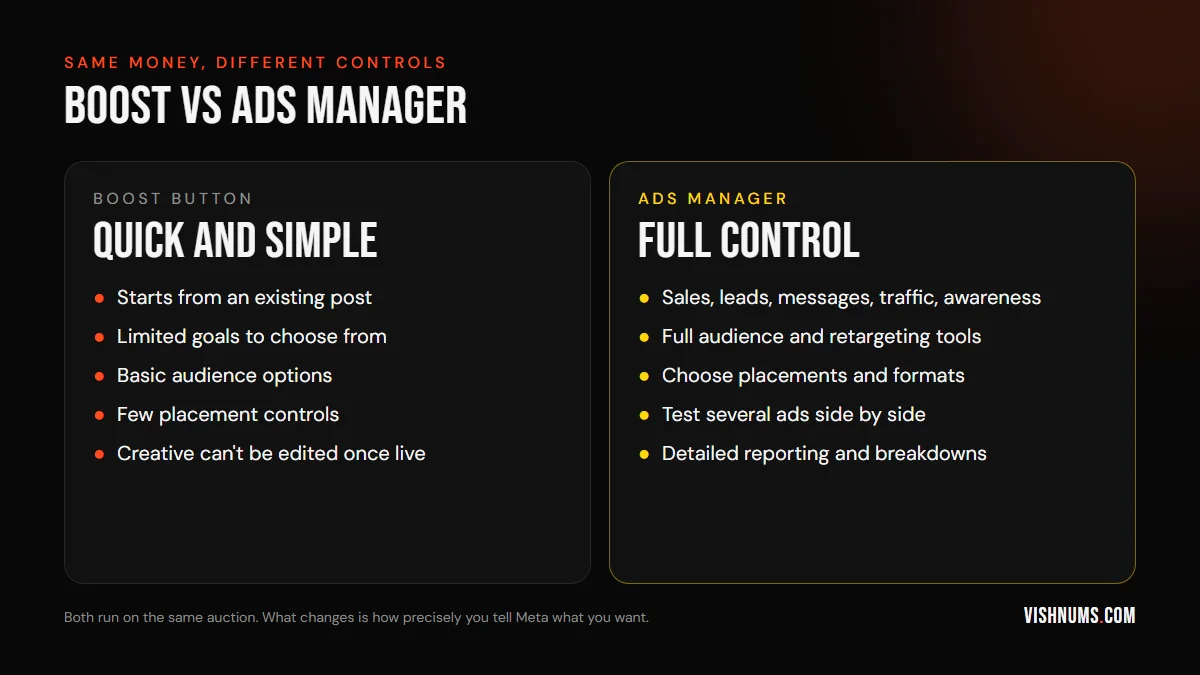
Ads Manager is Meta's full advertising tool. It gives you:
More objectives
Awareness, traffic, engagement, leads, app promotion and sales, each with detailed optimisation options. You can optimise for purchases on your website, leads through instant forms, conversations on WhatsApp, calls, and more.
Full audience tools
Custom audiences (website visitors, video viewers, Instagram engagers, customer lists), lookalike audiences, detailed targeting, exclusions, and broad targeting with Advantage+ audience.
Placement control
Choose where ads appear: Facebook Feed, Instagram Feed, Stories, Reels, Messenger, Audience Network, or let Meta decide automatically.
Multiple ads and testing
Run several creatives in one ad set, compare them, and let Meta spend more on the best performer. A/B tests let you compare audiences, creatives or placements properly.
Ads that don't need a post first
Create ads from scratch, including formats like carousels, collections and instant forms, without posting them on your Page first.
Detailed reporting
Breakdowns by age, gender, placement, region and time, plus custom columns for the metrics you care about.
The goal decides who sees your ad
This is the most important point in this guide. When you choose a goal, Meta looks for people most likely to take that action.
- Choose engagement, and Meta finds people who like, comment and share. Some will buy, but many simply enjoy engaging with posts.
- Choose messages, and Meta looks for people likely to start a conversation.
- Choose leads, and Meta looks for people likely to fill a form.
- Choose sales (with a working pixel and Conversions API), and Meta looks for people likely to buy on your website.
Many small businesses boost posts with an engagement goal, get hundreds of likes, and wonder why sales don't follow. The ad did exactly what it was asked to do. It found people who like things.
If you want sales or enquiries, choose a goal that matches. Boosting does offer some goals beyond engagement, like messages and website visitors, but Ads Manager gives you the full set, including sales optimisation.
When boosting is perfectly fine
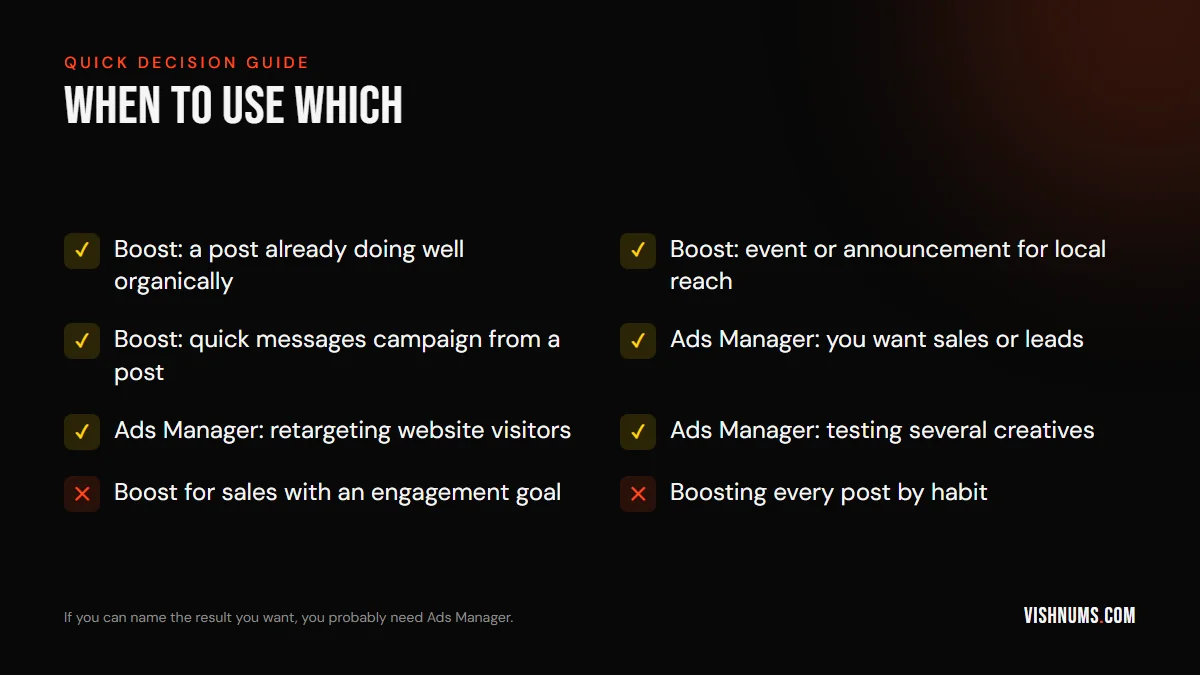
Boosting isn't wrong. It's a tool with a narrow job. It works well when:
- A post is already performing well organically. A Reel that's getting lots of views and shares can reach more people with a small boost.
- You want local awareness of an event or announcement: a new branch opening, a festival offer, a special menu, a workshop.
- You want messages from a specific post, using the messages goal, and you're ready to reply quickly.
- You're just starting out and want to learn how ads work with small amounts before investing time in Ads Manager.
- You have very little time, and simple reach is better than nothing.
When boosting quietly wastes money
Boosting tends to waste money when:
- You want sales but choose engagement. You'll get likes, not buyers.
- You boost every post by habit, without asking what each boost should achieve.
- You rely on interest targeting chosen in a few seconds, which may be far from your real customers.
- You never test different creatives, so you don't learn what works.
- You want to retarget website visitors or past customers, which boosting can't do as flexibly.
- You don't track results beyond likes and reach.
If two or more of these sound familiar, it's time to try Ads Manager.
A step-by-step first campaign in Ads Manager
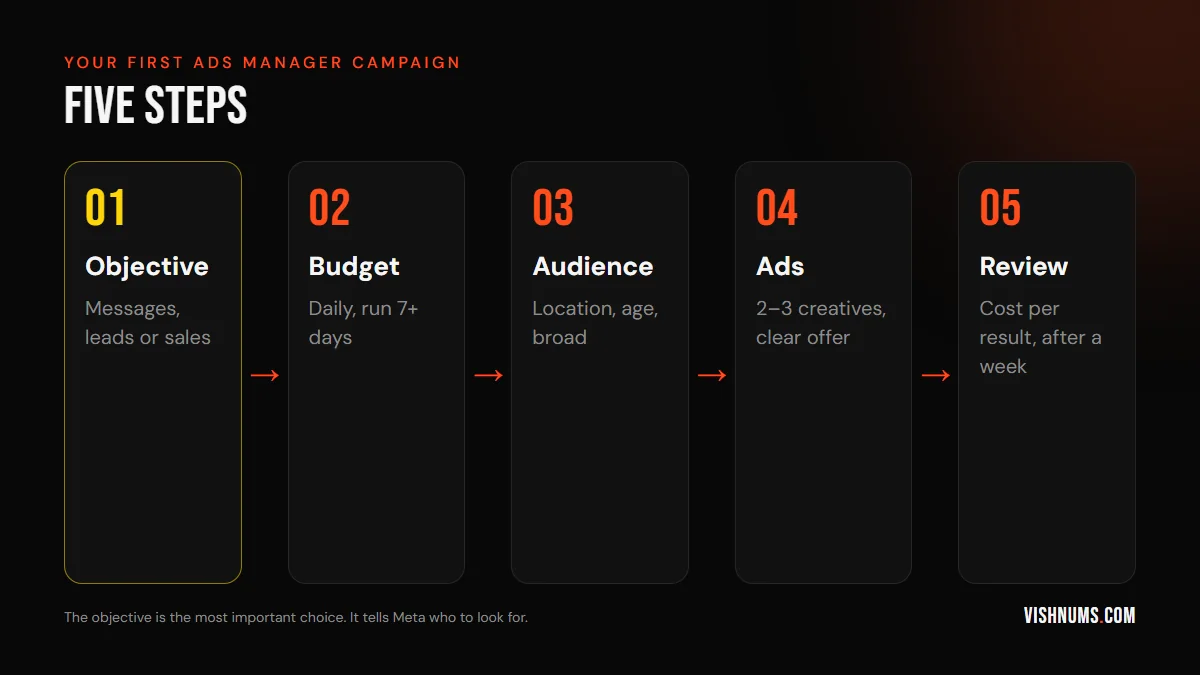
Here's a simple first campaign for a local business that wants WhatsApp enquiries. Adjust the objective for your own goal.
Step 1: Choose the objective
Open Ads Manager, click Create, and choose Engagement with the conversion location set to WhatsApp, or Leads if you want form submissions, or Sales if you sell online with the pixel set up. For a local business taking enquiries on WhatsApp, a messages setup is often the simplest start.
Step 2: Set the budget
Choose a daily budget you can comfortably sustain for at least seven days without worrying about it. Meta's system needs time to learn. Starting with a tiny budget for one or two days usually tells you very little.
Step 3: Define the audience
- Location: the area you serve. For a shop, a radius around it; for an online business, the regions you deliver to.
- Age: a sensible range for your customers, but don't narrow it too much.
- Detailed targeting: often, leave it broad and let the creative attract the right people. Meta's systems are good at finding buyers when the goal and creative are clear.
Step 4: Create the ads
Add two or three different creatives in the same ad set: for example, a product photo, a short video and a customer review. Write clear primary text with the offer, the price if relevant, and what happens when they message. Use your existing best posts if they're working well; you can select existing posts in Ads Manager too.
Step 5: Review after a week
After seven days, look at the cost per result (cost per conversation, lead or purchase), and more importantly, how many of those turned into real customers. Pause the weakest creative, add a new one, and keep going.
What to look at in reports
Ads Manager shows many numbers. For a small business, focus on a few:
- Results and cost per result: conversations, leads or purchases, and what each cost.
- Frequency: how many times the average person saw your ad. If it climbs high, people are getting tired of it. Meta ads frequency: what is too high explains more.
- CTR (link click-through rate): whether people find the ad interesting enough to click.
- Real outcomes: sales, bookings or visits that came from the ads, which you'll usually track outside Ads Manager.
Ignore likes and reach as measures of success unless awareness really is your only goal. A post with a thousand likes and no customers has cost you money; a modest-looking ad that brings ten paying customers has earned it. Keep a simple weekly note of spend, results and customers, so you can compare honestly over time.
Common mistakes when switching to Ads Manager
- Too many campaigns and ad sets for a small budget. Keep it simple: one campaign, one ad set, a few ads.
- Changing things every day. Give campaigns time to learn. Constant changes reset learning. If you see "Learning limited", read Meta ads learning limited on a small budget.
- Very narrow audiences that make ads expensive.
- Choosing traffic when you want sales. Traffic finds clickers, not buyers.
- No pixel or Conversions API for website businesses, so Meta can't learn who buys.
- Not replying to messages fast enough, which wastes good ads.
Writing ads that work, whichever tool you use
The tool matters less than the ad itself. A clear, relevant ad performs better whether boosted or created in Ads Manager. A simple structure for primary text:
- 01Who it's for or what it is: "Kids' theme birthday cakes in Kottayam."
- 02What makes it worth it: "Any design, fresh cream, delivered on time."
- 03The offer or price: "From ₹899 for 1 kg."
- 04What to do next: "Message us your date and design on WhatsApp."
Keep the first line strong, because most people read only that line before deciding whether to stop or keep scrolling. Use real photos and short videos of your product, shop or service rather than stock images. For local businesses, Malayalam or a mix of Malayalam and English often feels more natural; see regional-language ads.
Choosing between messages, leads and website traffic
Small businesses often ask which goal to choose for enquiries. A quick guide:
- Messages (WhatsApp, Messenger or Instagram Direct): best when customers have questions before buying, such as prices, availability, sizes or delivery. You need someone replying quickly.
- Leads (instant forms): best when you need specific details before calling back, such as location, budget or dates. Forms are fast to fill, so add a few qualifying questions to avoid junk leads.
- Website traffic: only useful if your website does the selling well and you can track what happens there. Otherwise, it often brings clicks without results.
- Sales: for online stores with the pixel and Conversions API set up properly.
Our guide to Click-to-WhatsApp vs lead form ads compares the first two in detail.
Retargeting: the biggest thing boosting can't do well
Retargeting means showing ads to people who already know you: website visitors, people who watched your videos, Instagram profile visitors, or past customers. These audiences often convert far better than strangers.
In Ads Manager, you can create custom audiences such as:
- People who visited your website in the past 30 days.
- Viewers who watched most of a video of yours.
- People who engaged with your Instagram profile.
- Customers from a list you upload, with their consent.
Then show them specific messages: a reminder, a testimonial, an offer. For high-value products and services, see retargeting windows for high-ticket products.
Boosting from Instagram
Instagram also has a Boost button on posts and Reels. It works similarly: you choose a goal (profile visits, website visits or messages), an audience, a budget and duration. The same advice applies. Boost Reels that are already doing well, and use Ads Manager for sales and leads.
If your Instagram and Facebook accounts are connected in Meta Business Suite, you can manage both boosts and Ads Manager campaigns from one place.
Set up the basics first
Before spending seriously on ads, whether by boosting or in Ads Manager, make sure:
- Your Facebook Page and Instagram account are connected in Meta Business Suite.
- You have a Business Portfolio (formerly Business Manager) with at least two admins, so you don't lose access if one account has problems.
- Your payment method works for international transactions; many Indian cards need this enabled. Meta ads payment failed in India explains common fixes.
- The pixel and Conversions API are installed, if you sell on a website.
- WhatsApp Business is connected, if you take enquiries on WhatsApp.
It's also worth understanding GST on Meta ads; see GST on Meta ads in India for how input tax credit works.
A tale of two campaigns
The café and its figures are hypothetical; the point is the contrast between the two approaches.
A café in Thrissur boosts a post about its new breakfast menu with ₹2,000 and an engagement goal. It gets 1,200 likes and comments, and staff notice a few new faces. The next month, it spends the same ₹2,000 in Ads Manager with a messages objective, a 4 km radius, two creatives (a breakfast plate video and a customer review), and a WhatsApp offer. It gets 70 conversations, and 30 people come in with the offer.
The engagement boost made the post look popular. The Ads Manager campaign brought customers, and the café could count them. Both had a purpose, but only one was aimed at the real goal.
Budgets: how much is enough?
There's no single right number, but a few principles help:
- Spend enough to get results you can learn from. If each enquiry costs a few hundred rupees, a budget that brings only two or three enquiries a week won't tell you much.
- Run for at least a week before judging, and ideally two.
- Keep a steady daily budget rather than switching on and off.
- Increase gradually when something works, rather than doubling overnight.
- Measure cost per customer, not just cost per message or lead.
A small business that spends a modest amount consistently, replies quickly and improves creatives every few weeks usually does better than one that spends large amounts in occasional bursts.
When to get help
You can run simple campaigns yourself. Consider getting help when:
- You're spending a meaningful amount every month and want better returns.
- You sell online and need the pixel, Conversions API and catalogue set up properly.
- Your account has been restricted or ads keep getting rejected.
- You want to scale beyond what you can manage alongside running the business.
Our guide to what a performance marketer does explains what to expect from a specialist, and freelance performance marketer vs agency in India helps you choose.
A 30-day plan for moving from boosting to Ads Manager
Week 1: set up Business Portfolio, connect accounts and payment, and decide your main goal (messages, leads or sales).
Week 2: launch one Ads Manager campaign with one ad set and two or three creatives. Keep boosting only your best organic posts.
Week 3: reply quickly to every result, and record which ones become customers.
Week 4: compare cost per customer from Ads Manager with your previous boosts, replace the weakest creative, and adjust the budget.
Frequently asked questions
Is boosting a post a waste of money?
Not always. Boosts suit a strong post or a local announcement that simply needs more eyes. It wastes money when you want sales or leads but choose an engagement goal, or when you boost every post without a clear purpose.
Is Ads Manager better than boosting?
Ads Manager offers more goals, audiences, placements and reporting, which usually makes it better for sales and leads. For simple reach, boosting can be enough.
Do boosted posts cost more than Ads Manager ads?
There's no special price for boosts. Both use the same auction. Differences in results come from the goal, audience and creative choices.
Can I edit a boosted post after it starts?
You can change the budget and duration, but not the post's text, image or video once it's running as an ad. Create a new post and boost that instead.
What objective should a small business choose in Ads Manager?
The one that matches the result you want: messages or leads for enquiries, sales for online purchases, and awareness only when reach is the real goal.
How much should a small business spend on Meta ads?
Start with a daily budget you can sustain for at least a week or two, measure the cost per real customer, and increase spend on what works.
Can I retarget website visitors with a boosted post?
Not with the same flexibility. Retargeting website visitors, video viewers and customer lists is done best in Ads Manager with custom audiences.
Want help moving from boosting to campaigns that bring customers? Request a quote.
Ads, a website that converts, or both: get a custom quote.