Meta Ads Attribution Settings Explained (2026): Click, Engage-Through and View-Through
What 7-day click, 1-day engage-through and 1-day view mean in Meta ads in 2026, what changed this year, which setting suits your business, and how to compare Meta with GA4 and real sales.
Every Meta ads report shows results: purchases, leads, registrations. But how does Meta decide that a sale came from an ad? The answer is the attribution setting, and it quietly shapes almost every decision advertisers make: which campaigns look profitable, which creatives get more budget, and whether Meta ads "work" at all.
Attribution also changed in 2026. Meta removed longer view-through windows from reporting, changed what counts as a click, and replaced "engaged-view" with a broader "engage-through" attribution. If your reported results shifted this year, these changes may be part of the reason.
This guide explains Meta's attribution settings in plain language: the three types of attribution, what the windows mean, what changed, which settings suit different businesses, how attribution affects optimisation as well as reporting, how to compare Meta with GA4 and your real sales, and how to make better decisions despite imperfect data. It also covers India-specific issues like cash on delivery, how attribution works for lead and WhatsApp campaigns, and a simple holdout test you can run without a big budget.
Meta's documentation and features change often. Use this as a guide to the concepts and check the current options in your Ads Manager before making changes.
Key points
- Meta credits a conversion to an ad if it happens within a set time after someone clicks, engages with or views the ad.
- In 2026, the typical default for website conversion ad sets is 7-day click-through, 1-day engage-through and 1-day view-through.
- Click-through now counts link clicks only; other interactions fall under engage-through.
- Longer view-through windows (7-day and 28-day view) are no longer available in reporting.
- Your attribution setting affects both reporting and how Meta optimises delivery.
- Compare Meta's numbers with GA4 and your actual sales over weeks, and judge by real revenue.
What attribution means
Attribution is the rule for deciding which ad gets credit for a conversion. When someone buys from your website after seeing your ad, Meta checks whether they interacted with the ad recently enough to count it. If yes, the ad gets credit, and that conversion appears in Ads Manager.
The rule has two parts:
- The type of interaction: clicking a link, engaging in another way, or just seeing the ad.
- The window: how long after that interaction the conversion can happen and still count.
Change either, and the reported results change, even though your real sales are the same.
The three types of attribution
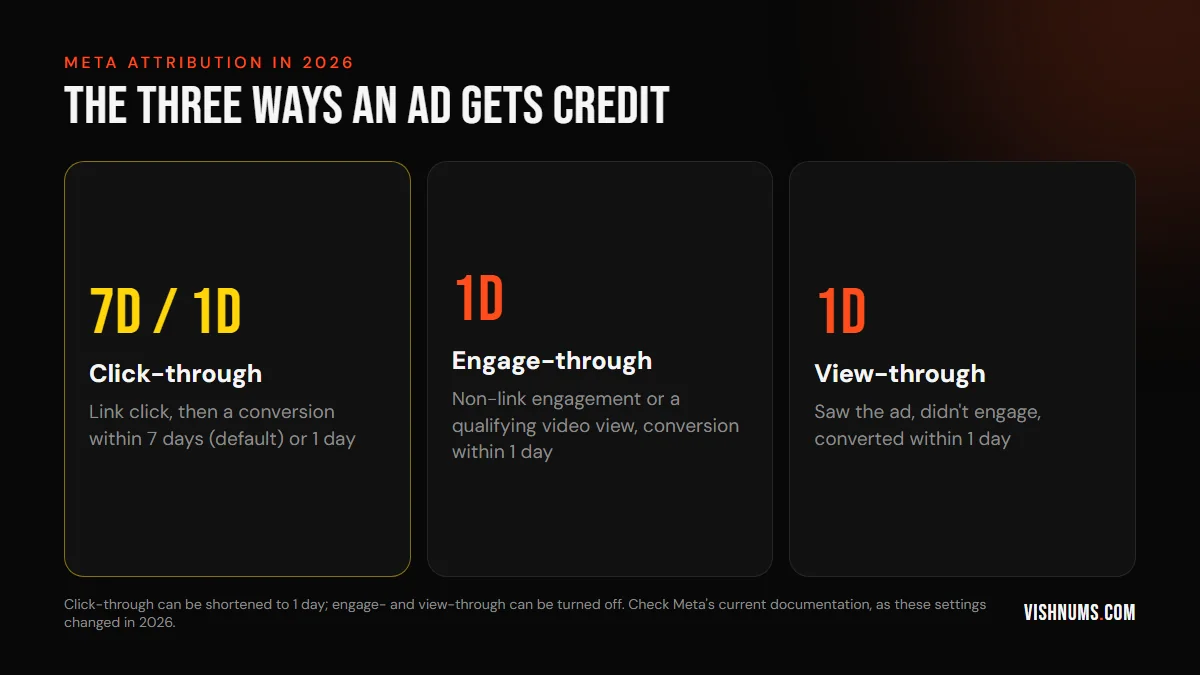
Click-through
The person clicked a link in your ad (for example, to your website) and then converted within the window. The default is 7 days; you can choose 1 day. Since a change in March 2026, only link clicks count here; other clicks, such as on the profile name or "See more", are handled by engage-through.
Engage-through
The person engaged with the ad in a way other than a link click, such as liking, commenting, sharing, saving, or watching a video for a qualifying amount, and then converted within the window, usually 1 day. This replaced the older "engaged-view" attribution, which only covered video views. You can usually turn it off.
View-through
The person saw the ad but didn't click or engage, and converted within the window, now 1 day. You can usually turn it off. View-through credit is the most debated, because some of those people would have bought anyway.
What changed in 2026
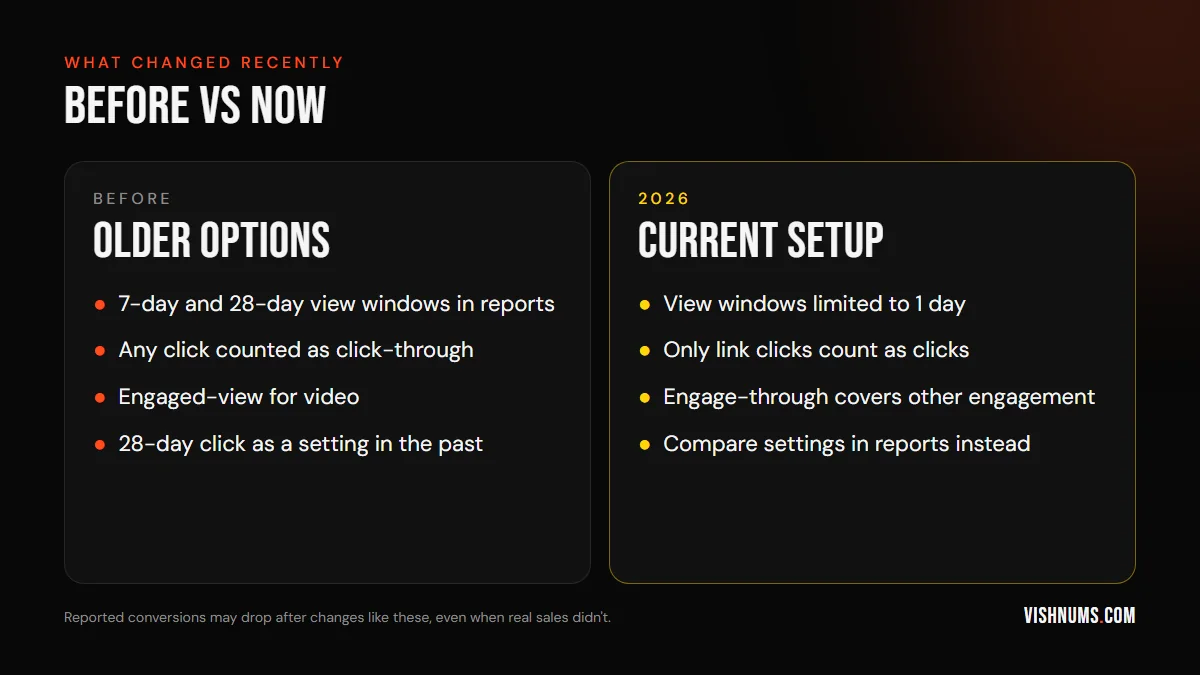
Several changes happened over the past year:
- Longer view-through windows removed: reports widely describe Meta removing 7-day view and 28-day view windows from Ads Manager and its reporting API in January 2026. Advertisers who relied on them saw fewer reported conversions.
- Click-through narrowed: from March 2026, only link clicks count as click-through. Other clicks moved to engage-through.
- Engage-through introduced: replacing engaged-view, it credits conversions after non-link engagement, including qualifying video views.
- 28-day click isn't available as an optimisation setting, though you may still be able to view longer windows through the comparison features in reporting.
If your reported conversions dropped around these dates without a matching drop in actual sales, the change in attribution is a likely explanation. Don't panic-pause campaigns because of a reporting change; check your real sales first.
Attribution affects optimisation, not just reporting
This is the part many advertisers miss. Your attribution setting doesn't just change how results are counted after the fact. It also tells Meta which conversions to learn from when deciding who to show ads to.
- With 7-day click, Meta learns from people who clicked and bought within a week. That suits products people think about before buying.
- With 1-day click, Meta learns only from quick buyers, which suits impulse purchases but may miss people who take longer.
- Including view-through and engage-through adds conversions from people who didn't click, which can help Meta find buyers who see ads and then visit later in other ways. It can also give credit to people who'd have bought anyway.
Changing the setting can therefore change who sees your ads, not just your report. Test changes carefully, one at a time.
Which setting should you use?
There's no universal answer, but some guidelines help:
Most e-commerce stores
The default (7-day click with 1-day engage-through and 1-day view) is a reasonable starting point. It gives Meta enough data to learn, especially for smaller accounts.
High-ticket purchases
For products and services people consider for days or weeks, like jewellery, furniture, courses or travel, 7-day click is important. Shorter windows miss many real buyers. Our guide to retargeting windows for high-ticket products covers the related question of how long to retarget.
Impulse and low-priced products
If most buyers purchase the same day, 1-day click may give you a cleaner view, though it reduces the data Meta has to learn from.
Businesses sceptical of view-through
If you suspect view-through credit is inflating results (for example, because many of your customers would buy anyway), compare results with and without it in reporting before switching it off for delivery.
Leads and messaging
For lead forms and Click-to-WhatsApp ads, conversions usually happen inside Meta's apps, so attribution is more direct. The bigger question is lead quality, which depends on what happens after the lead. See why Facebook ads bring leads but no sales.
Compare attribution settings in reports
Ads Manager lets you compare how results look under different attribution settings without changing the ad set. Use the "Compare attribution settings" option in the columns or breakdown menu (the exact location varies) to see conversions by click-through, engage-through and view-through windows side by side.
This tells you how much of your reported result depends on each type:
- If most conversions come from 7-day click, your results are fairly robust.
- If a large share comes from 1-day view, look closely: are those real incremental sales?
- If engage-through is significant, your video and engagement-heavy creatives may be doing more than click data suggests.
Review this monthly, and especially after any big creative or audience change. Keep a simple log of the split over time, so you notice when it shifts.
Incremental attribution
Meta has also introduced an incremental attribution option, which aims to credit only conversions that the ads likely caused, rather than every conversion that happened after an interaction. It's based on Meta's modelling and may not be available to every account or objective.
Incrementality is the question that matters most: would this sale have happened without the ad? If incremental attribution is available to you, test it on one campaign and compare results. For larger budgets, conversion lift studies (where Meta compares a group who saw ads with a group who didn't) give stronger answers.
Why Meta, GA4 and your sales never match
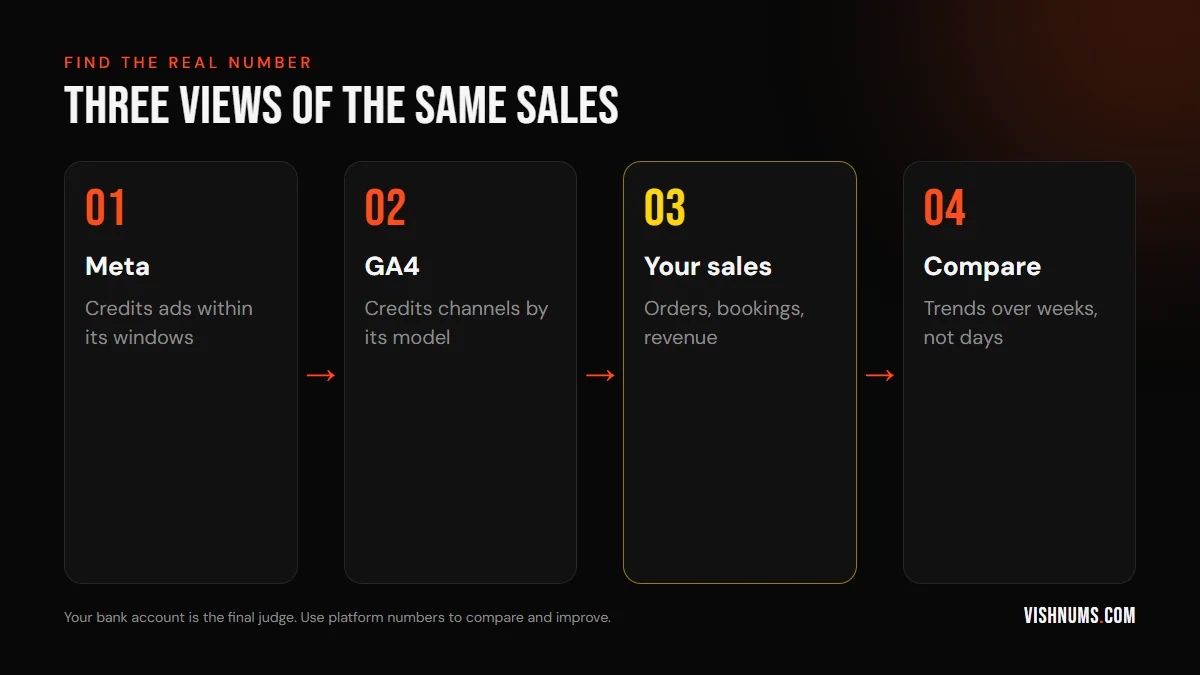
Even with perfect tracking, Meta and GA4 will report different numbers:
- Meta counts views and engagements; GA4 can't see them.
- Meta credits conversions to the date of the ad interaction; GA4 credits the date of the conversion.
- GA4 uses its own attribution model across all channels, so Google Ads, organic search and direct visits also compete for credit.
- Cross-device journeys: Meta links a phone click to a later laptop purchase when people stay logged in, something GA4 usually cannot do.
- Consent and blockers reduce what GA4 records.
Neither is "right." They're different lenses. Your own sales data, whether Shopify orders, CRM bookings or bank receipts, is the truth they're both estimating.
For GA4 setup, see UTM parameters for Meta ads in GA4.
A practical way to judge results
Instead of arguing about which number is right, use a simple routine:
- 01Track real results weekly: total orders, revenue, bookings or leads that became customers, from your own systems.
- 02Track total Meta spend in the same period.
- 03Calculate blended return: total revenue divided by total ad spend across all channels, or by Meta spend if Meta is your main channel.
- 04Watch trends: when you increase Meta spend, do real sales rise? When you pause it, do they fall?
- 05Use Meta's reports for decisions within Meta: which campaigns, audiences and creatives perform better relative to each other.
This approach is often called looking at "blended" or "marketing efficiency" metrics. It's less precise than platform reports for individual ads, but much more honest about whether advertising is paying off.
Cash on delivery changes the picture
In India, many online orders are cash on delivery, and some of those are refused or never delivered. Meta's pixel records a purchase when the order is placed, not when it's delivered and paid for. That means Meta's reported purchases and revenue can be noticeably higher than the money you actually receive.
To deal with this:
- Track delivered orders and returns (RTO) by campaign in your own systems.
- Calculate your real ROAS using delivered revenue, not reported revenue.
- Consider sending a separate event for confirmed or delivered orders through the Conversions API, so Meta can learn from orders that actually complete.
- Reduce RTO with order confirmation and prepaid incentives; see how to reduce RTO on COD orders from Meta ads.
A campaign that looks profitable in Ads Manager can lose money once returns are counted, especially if it attracts a lot of COD buyers.
Attribution for leads and WhatsApp
For lead form and Click-to-WhatsApp campaigns, the conversion (a submitted form or a started conversation) usually happens inside Meta's apps, right after the click. Attribution windows matter less for counting leads.
The real attribution question for these businesses is what happens next: which leads became customers, and from which campaigns and ads. Meta can't see that unless you tell it:
- Record the campaign and ad for every lead in your CRM or spreadsheet.
- Mark which leads became customers, and when.
- Send those outcomes back to Meta as conversion events, so the system learns to find people like your buyers.
Our guides to tracking WhatsApp leads from Facebook ads and getting lead form leads into Google Sheets explain the practical steps.
A simple holdout test for smaller budgets
Conversion lift studies need large budgets, but you can run a rough test of whether your ads drive extra sales:
- 01Pick a region you can separate cleanly, such as one district or city where you sell.
- 02Pause Meta ads in that region for two to four weeks, while keeping them running elsewhere.
- 03Compare sales trends in the paused region with the regions where ads continue, against the same period before.
- 04Restart ads and watch whether sales recover.
This is imperfect (other factors affect sales too), but it gives you real-world evidence beyond platform reports. Many businesses discover their ads are doing more, or less, than the reports suggested.
A short glossary
- Attribution window: the time after an ad interaction during which a conversion counts.
- Click-through: a conversion after a link click on the ad.
- Engage-through: a conversion after a non-link engagement or qualifying video view.
- View-through: a conversion after seeing the ad without clicking or engaging.
- Incrementality: whether a conversion happened because of the ad, rather than just after it.
- Blended ROAS: total revenue divided by total ad spend across channels.
- Conversions API: a server-side connection that sends conversion events to Meta directly from your website or systems.
- Event match quality: a score showing how well Meta can match your conversion events to people.
Send better data to Meta
Attribution works only on the conversions Meta knows about. Improve the data:
- Install the Conversions API alongside the pixel, so conversions are recorded even when browsers block the pixel.
- Send offline conversions: bookings, store sales or CRM outcomes, matched to ad interactions. Our guide to sending CRM bookings to the Conversions API explains how.
- Check event match quality in Events Manager and improve it by sending more customer information (hashed), such as email and phone, with consent.
- Avoid duplicate events from the pixel and Conversions API by setting up deduplication.
Better data means Meta attributes and optimises more accurately, whichever window you use.
How to change the setting safely
If you decide to change an ad set's attribution setting, do it carefully:
- 01Compare first: use the comparison view in reporting to see how results would look under the new setting.
- 02Change one ad set or campaign, not the whole account.
- 03Expect a learning period: Meta may need time to adjust delivery to the new optimisation signal.
- 04Note the date of the change, so you don't mistake a reporting shift for a performance change.
- 05Judge after two to four weeks, using real sales as well as Meta's reports.
Avoid switching back and forth. Every change makes past and future results harder to compare.
Questions to ask your agency or marketer
If someone else manages your ads, these questions show whether they understand attribution:
- Which attribution setting are our ad sets using, and why?
- How much of our reported result comes from click-through versus view-through?
- How do Meta's numbers compare with our actual sales and GA4?
- Are we sending offline or CRM conversions back to Meta?
- How do we account for COD returns or cancelled bookings?
A good marketer will answer clearly and won't claim Meta's numbers are the whole truth. Our guide to questions to ask when hiring a Meta ads expert has more.
Traps to avoid
- Panicking about a reporting drop caused by an attribution change, and pausing working campaigns.
- Judging campaigns only by Meta's numbers, without checking real sales.
- Expecting GA4 and Meta to match.
- Changing attribution settings often, which resets learning and makes comparisons impossible.
- Using 1-day click for high-ticket products and starving Meta of data.
- Ignoring view-through inflation in accounts with many returning customers.
- Poor tracking, with no Conversions API or offline conversions.
One month, three different numbers
The brand and figures below are hypothetical, used to show how the settings change the picture.
A jewellery brand spends ₹1 lakh in a month. Ads Manager, with the default setting, reports 50 purchases. Comparing settings shows 30 from 7-day click, 5 from 1-day engage-through and 15 from 1-day view. GA4 shows 22 purchases from Meta traffic. Shopify shows 140 total orders for the month, up from 100 the month before when Meta spend was half as much.
What does the brand know? Click-based conversions are solid. View-through is a large share, worth testing for incrementality. GA4 undercounts as expected. And total orders rose meaningfully as spend increased, which is the strongest sign the ads are working. Our guide to break-even ROAS for Indian D2C brands explains how to judge whether those orders are profitable.
Sources and further reading
Attribution options are still evolving; these explain the current setup:
- Jon Loomer: How Meta Ads Attribution Works in 2026
- Meta Business Help Center for current attribution setting definitions
Frequently asked questions
What is the default attribution setting in Meta ads in 2026?
For most website conversion ad sets, it's 7-day click-through, 1-day engage-through and 1-day view-through. Check your ad set settings, as defaults can vary by objective.
What is engage-through attribution?
It credits conversions that happen within a day after someone engages with your ad in a way other than a link click, such as a like, comment, share, save or qualifying video view. It replaced the older engaged-view attribution.
Did Meta remove the 7-day view attribution window?
Reports say Meta removed 7-day and 28-day view windows from Ads Manager reporting and its API in January 2026. View-through is now limited to 1 day.
Does changing the attribution setting affect ad delivery?
Yes. The setting affects which conversions Meta learns from when optimising, so it can change who sees your ads, not just how results are reported.
Why does Meta report more sales than GA4?
Meta counts view-through and engage-through conversions, uses different windows and dates, and can connect cross-device journeys. GA4 sees only website sessions and uses its own model.
Which attribution setting is best for high-ticket products?
Usually 7-day click, because buyers take time to decide. Shorter windows miss real buyers and give Meta less data to learn from.
How do COD returns affect Meta attribution?
Meta records purchases when orders are placed, so refused or undelivered COD orders still appear as conversions. Track delivered revenue by campaign and calculate ROAS from what you actually receive.
Want a clearer picture of what your Meta ads really deliver? Request a quote.
Ads, a website that converts, or both: get a custom quote.